Choose a seat for the activity, not for status symbolism
Contemporary office feng shui often combines a visible approach, backing, and a position outside the main traffic line under the English label 'command position'. It should not be presented as one classical formula or as a measured prediction of focus, status, or interruption control.
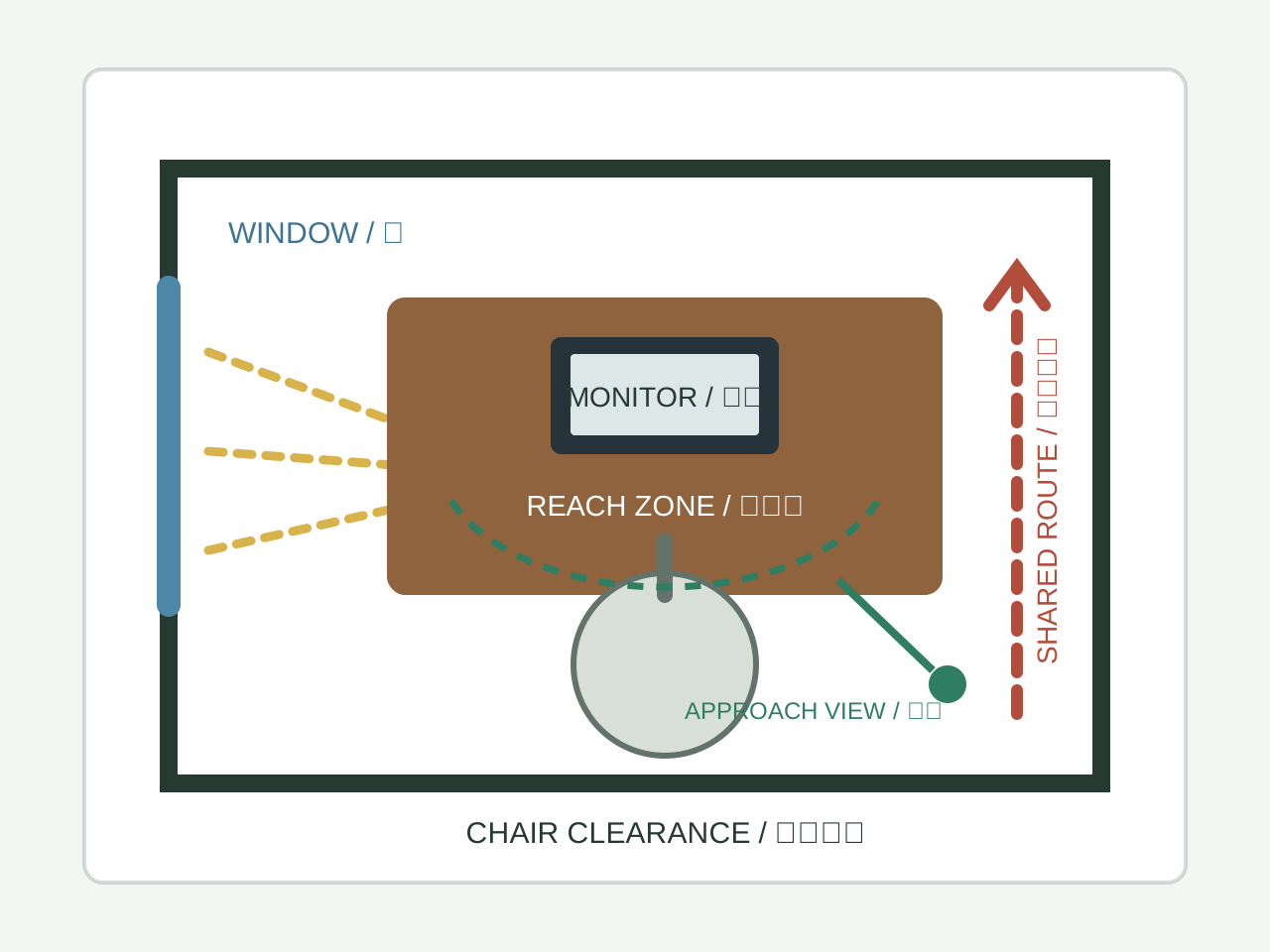
Translate the rule into observations. Count unplanned approaches, note screen glare and confidential sightlines, measure chair clearance, and ask whether the seat supports the actual activity. A back-to-door seat is not automatically stressful, and a wall-facing seat is not automatically isolating; evidence comes from the person, task, and recorded conditions.
Three popular position claims to test separately
Do not bundle these contemporary preferences into one promised outcome; check each against the real workplace:
| Rule | What it means | Why it matters |
|---|---|---|
| Solid backing (有靠) | A wall or high-backed chair behind you, not a window, aisle, or open space | Traditional backing is a visual preference. Separately check glare, audibility, approach direction, ventilation, and chair clearance; a high-backed chair is not equivalent to a wall. |
| Visible approach | You can see the entrance to the room or work area without repeated twisting | A visible approach may suit reception or coordination and may distract focused work. It is not a synonym for the broader traditional term 明堂. Count approaches and ask the worker rather than assuming a psychological benefit. |
| Not in the direct path (不冲) | Your seat is outside the door swing, main walkway, or corridor | This can be assessed through clearance, collision risk, screen privacy, noise, and recorded interruptions. Emergency and accessible circulation take priority. |
A worked example: the cubicle next to the door
Consider a fictional marketing manager in the first cubicle by a department entrance. Her desk faces the partition and the door is about two metres behind. For five workdays she records 4-5 unplanned approaches per hour during two focus blocks; that baseline, not the feng shui label, defines the problem.
The popular feng shui label says the visible-approach and backing preferences are not met. The operational record says she is the first desk in a high-traffic route and receives repeated unplanned approaches. That observed route, not luck or a position name, supplies the testable explanation.
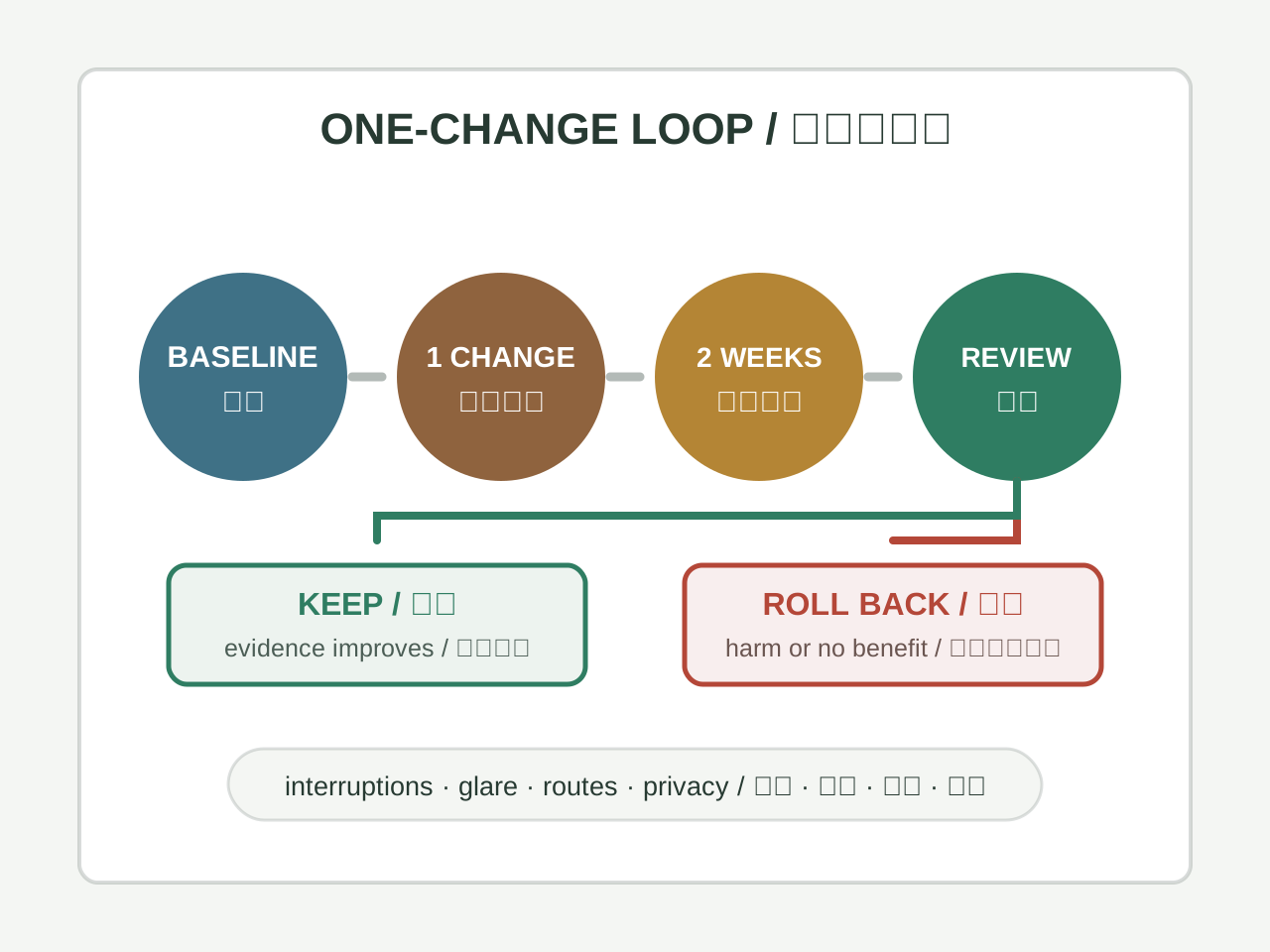
She asks the facilities owner before changing the shared workstation. They test one variable: a small privacy panel and a visible focus-status sign, while keeping the aisle, lighting, ventilation, and screen privacy compliant. A mirror is tested separately only if it does not expose other screens.
For the next five workdays she records the same two focus blocks. If unplanned approaches fall without creating a new collaboration or accessibility problem, the team can keep the change; otherwise they roll it back. This example demonstrates a method, not evidence that a plant, mirror, or named position reduces interruptions.
Open-plan offices: what to do when you cannot control your seat
Most office workers do not choose their desk location. The popular position checklist is only one preference set, not an office ideal. Here is what may still be adjustable in a fixed seat:
- Chair selection: use the employer's ergonomic criteria for fit, adjustability, lumbar support, and task duration. Back height does not reproduce a wall or prove a psychological effect.
- Screen orientation: control glare, neck rotation, confidential sightlines, and visual distraction. A change of angle is useful only when those observations improve.
- A small mirror: optional for approach awareness, subject to workplace privacy and distraction rules. It does not reproduce the acoustic, spatial, or privacy properties of a different office.
- Headphones: follow safety and communication rules. Noise control may help some tasks, but headphones can hide alarms, approaches, or necessary conversation.
- A defined boundary: a status sign, agreed focus hours, or a facilities-approved screen is easier to evaluate than assuming a plant or personal object changes behaviour.
What you face matters more than what direction your back is in
Some office feng shui methods add an auspicious facing direction based on a Kua number or birth date. Begin instead with the information and people the task requires. Reception may need approach visibility; confidential screen work may need a protected sightline; collaboration and focused work can need different orientations.
Test the same activity in each feasible position. A wall-facing programmer and a room-facing manager are only examples, not rules about job titles. Keep the orientation that satisfies the task, user, screen, light, privacy, communication, and access requirements; use a compass preference only between equally workable options.
The honest limit
A seat changes measurable conditions such as glare, reach, clearance, audibility, screen privacy, and exposure to traffic. It does not automatically reduce interruptions, improve focus, create control, guarantee promotion, prevent layoffs, or attract wealth. Use each traditional preference only as a question, then rely on worker feedback, a repeatable baseline, occupational guidance, and the needs of the shared workplace.
A seat-position test for real work
List the activity, session length, need for privacy, collaboration pattern, door and screen sightlines, lighting, noise, temperature, and accessibility requirements. A reception seat, focused workstation, meeting chair, and home study chair need different solutions.
Test the feasible position for five working days. Record startle events, interruptions, glare, reaching, posture discomfort, and whether circulation is blocked. Use a stable chair, monitor adjustment, screen, lighting, or storage change to address the observed cause. Keep the position only when it supports both the user and the people sharing the route.
Do not infer status, career outcome, or personal authority from one seat direction. Persistent discomfort requires ergonomic or medical assessment, and any route or electrical hazard must be corrected first.
Review accessibility and handover for shared seats
A hot desk, reception point, meeting chair, or training room seat changes users throughout the day. Record the required reach, transfer space, visual and audible cues, screen privacy, route width, emergency access, and how settings are restored after each user. Do not assume that the person who reports no problem represents everyone who will use the seat.
The CCOHS office-ergonomics reference listed below supports checking fit, adjustability, posture, reach, lighting, and comfort. It does not establish that a solid wall, high-backed chair, visible door, or compass direction improves focus or authority. Treat those as separate preferences and test only after the physical requirements are met.
At handover, save the approved range of adjustments, equipment location, cleaning requirement, privacy rule, owner, and reporting path. Stop using the position when a user cannot access controls, the route narrows, confidential information becomes visible, alarms or colleagues cannot be heard, or discomfort persists.
Choose a seat by activity
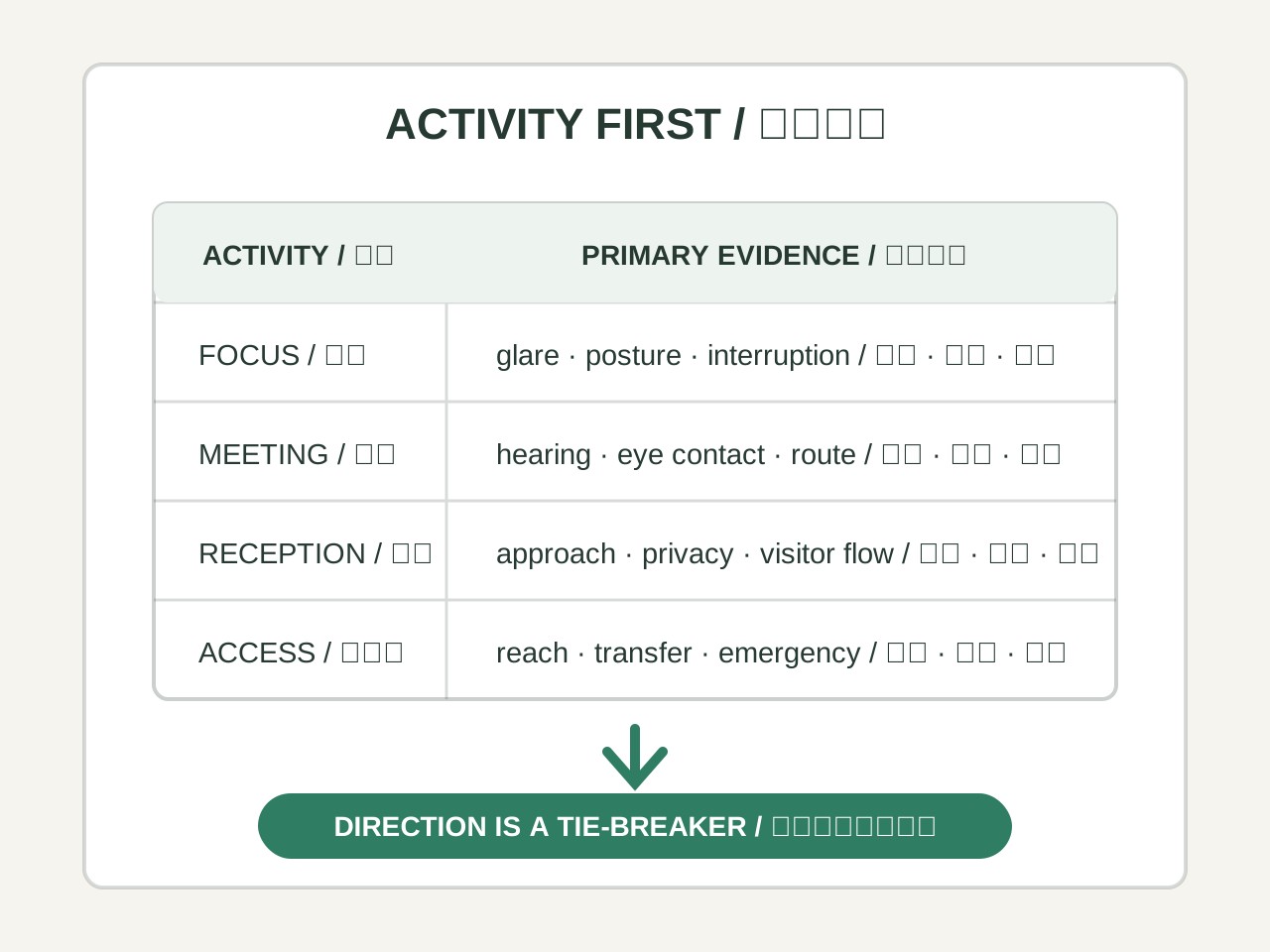
Start with the work performed in the seat. A position that supports a short meeting can be unsuitable for prolonged screen work, confidential calls, reception, study, or a user with mobility needs.
Test the same activity in each feasible position and document the result. Direction is a secondary preference only after the seat, screen, light, route, privacy, and access requirements are met. Save the test date, user, task duration, observed problem, and rollback reason so later changes can be compared against the same evidence.
| Activity | Primary requirement | Evidence to review |
|---|---|---|
| Focused screen work | Stable posture, controlled glare, limited interruption | Five-day discomfort and interruption log |
| Conversation or meeting | Eye contact, audibility, inclusive access | Participant feedback and circulation check |
| Reception | Approach visibility, clear visitor route, privacy | Visitor flow and confidential-screen review |
| Short shared use | Easy adjustment and reset instructions | Different-user setup test |
| Accessibility support | Reach, transfer, route width, emergency plan | User feedback and qualified workplace review |
Seat position as an ergonomic question
A seat has several practical variables: back support, screen height, reach distance, glare, air movement, noise, privacy, and the ability to stand or move. Inspect these before treating a direction or wall position as meaningful. A chair facing a preferred direction is not a good arrangement if it causes neck strain or blocks an accessible route.
Ask the user to describe a normal work period rather than posing an abstract question about the “best” seat. A short observation of posture and interruptions often reveals a useful change: raising the screen, moving a lamp, changing the chair, or relocating a frequently used item.
- Check the specific issue described in “Seat position as an ergonomic question” before changing the arrangement or interpretation.
- Keep the action reversible and record what evidence would change the decision.
Shared spaces and negotiation
In a family room or open office, one person’s preferred position can affect everyone else. Discuss sightlines, conversation, children’s movement, cleaning, accessibility, and emergency access. If no position satisfies every preference, write down the trade-off and choose the safest workable arrangement.
A symbolic explanation should not be used to shame someone for being uncomfortable or to claim that a person deserves a particular seat. The reader should be able to disagree and still make a reasonable decision.
- Check the specific issue described in “Shared spaces and negotiation” before changing the arrangement or interpretation.
- Keep the action reversible and record what evidence would change the decision.
A reversible seat trial
Mark two possible positions and try each for several comparable sessions. Record comfort, glare, noise, interruptions, and how quickly the user can begin the intended task. Move only one variable at a time where possible. If the result is inconclusive, keep the cheaper and safer arrangement rather than escalating to expensive furniture or renovation.
This trial gives traditional placement a modest role: it can suggest what to observe, while the final choice is based on the person’s actual use of the room and the constraints of the space.
- Check the specific issue described in “A reversible seat trial” before changing the arrangement or interpretation.
- Keep the action reversible and record what evidence would change the decision.
A concrete reader question
A useful way to read Office Seat Position Feng Shui and Workstation Review is to begin with a concrete question rather than a general promise. The page describes compare office seats by approach visibility, rear traffic, screen glare, reach, accessibility, and collaboration needs, then test one change for five workdays. A reader should write down what they want to understand, what information they already have, and what decision still belongs to them. If the question concerns a room, include the people who use it, the route through it, light, sound, maintenance, privacy, and safety. If it concerns a chart, date, symbol, name, dream, face, or palm, preserve the input, source, calendar or dictionary rule, and any uncertainty. This makes the topic specific enough to review instead of allowing a familiar term to stand in for an explanation.
Separate three layers in the notes: what the tradition means, what can be observed now, and what action is practical. A cultural association can be worth studying without being a verified prediction. The distinction is especially important when the topic sounds personal or consequential.
A worked comparison
Use one ordinary case related to Office Seat Position Feng Shui and Workstation Review. Describe the situation in plain language before applying specialist vocabulary. Then compare two possible readings or actions in a table: input, method, expected implication, observable evidence, cost, risk, affected people, reversibility, and review date. If the topic involves a proposed arrangement, compare access, lighting, noise, comfort, cleaning, privacy, and shared agreement. If it involves a calculation or interpretation, compare the calendar, time boundary, source, school, dictionary, or weighting rule.
Do not hide a disagreement by averaging incompatible methods. State which conclusion changes under which assumption. Write one ordinary explanation beside the traditional one: workload, sleep, communication, budget, maintenance, camera angle, weather, or a simple input error may explain the same experience. A fair comparison makes room for curiosity and correction.
A low-risk next step
Choose one modest next step connected to Office Seat Position Feng Shui and Workstation Review. Check a source, repeat a measurement, ask the person affected, observe the space at another time, compare two declared inputs, or keep a short record for a defined period. Change only one condition. Before acting, record the baseline and obtain consent if another person or shared space is involved. Avoid structural work, large purchases, or irreversible decisions until the practical issue is understood and the appropriate professional advice has been considered.
Review the result without treating sequence as proof of cause. Record what improved, what became harder, and what did not change. If a practical adjustment helps, acknowledge ordinary reasons that may have contributed. If it fails, undo or revise it rather than escalating automatically or blaming the reader. The value of a small test is that it can change the question.
Sources and limits
A reader should be able to see where the explanation comes from. Record the source, author or tradition, date accessed, terminology, and method used for Office Seat Position Feng Shui and Workstation Review. Mark whether a statement is historical description, practitioner interpretation, direct observation, or practical advice. These categories should not be blended into a claim of scientific certainty. When two sources use the same word differently, preserve both definitions and explain which one this page follows.
The page is cultural and reflective material. It cannot diagnose illness, guarantee income, determine a person’s fixed character, prove relationship compatibility, replace legal or financial advice, or override safety and consent. Use proportionate language such as traditionally associated, one school interprets, or this input may suggest. Clear limits increase usefulness rather than weakening it.
A review record for future readers
Close a study of Office Seat Position Feng Shui and Workstation Review with a record another reader could understand months later: original question, inputs, source, method, interpretation, ordinary explanation, action, cost, affected people, observed result, and next review date. Include evidence that did not fit the preferred explanation. If the original input was uncertain, do not rewrite it after the result is known. This preserves the difference between what was known at the beginning and what was learned later.
The reader remains free to disagree, seek another source, postpone action, or stop. If the issue involves health, safety, law, money, employment, structural work, or relationship coercion, use the relevant professional or shared process. The strongest conclusion is often a clearer question and a reversible next step, not a dramatic promise.
Disclaimer: This content is for informational and cultural reference purposes only. It does not constitute professional medical, legal, financial, or psychological advice. Readers should exercise their own judgment and consult qualified professionals for specific concerns.
Sources and review basis
Traditional references explain historical vocabulary and context. Official practical sources support only the observable safety, comfort, or environmental points noted in the article; they do not validate metaphysical claims.
Traditional reference
Huangdi Zhaijing (黄帝宅经)Wikisource digital text · Accessed 2026-07-14
Historical context for traditional residential orientation and spatial vocabulary. Modern recommendations are reviewed separately.
Practical source
CCOHS: Office ErgonomicsCanadian Centre for Occupational Health and Safety · Accessed 2026-07-14
Practical guidance for workstation setup, posture, reach, lighting, and office comfort.